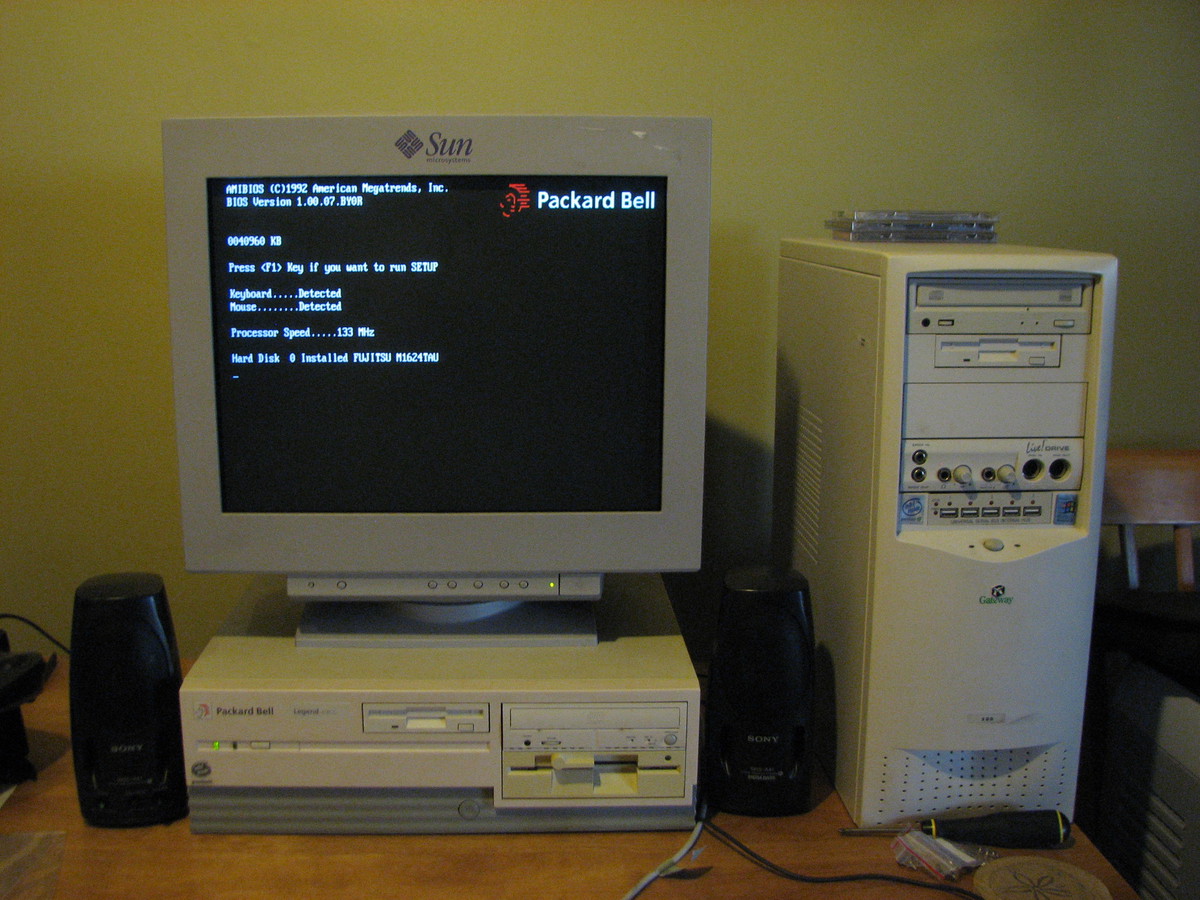
My first[1] computer was a Packard Bell Legend 418CD, which my parents bought for me toward the end of my freshman year of high school (1995). I'd always been somewhat interested in and fascinated by computers, but it wasn't until my freshman year that I began to take a strong interest in them (mostly because one of my friends in high school, Aaron Mielke (man, I hope spelled that right) was into computers himself, but unlike me actually knew what he was doing and taught me a great deal about how they work). My Packard Bell, despite the company's general reputation for cheap/poor quality, was a fantastic system that served me well for many years. When purchased, it had the following specs:
This was a pretty pimpin' system back in 1995. It came with Windows for Workgroups 3.11 and MS-DOS 6.2, and although Windows 95 had been released a couple months earlier, I was perfectly happy with 3.11 as really didn't like the new interface in 95 at the time (in fact, I didn't upgrade to 95 until 1998, and even then only because Final Fantasy VII PC required it, and I really wanted to play Final Fantasy VII). Retrospectively, I'm still glad it came with 3.11 because it gave me the opportunity to learn a lot about DOS and pre-95 versions of Windows that I otherwise would've missed out on.
I was really into gaming at the time, and was able to play any game I wanted on it at the time and, after some upgrades, for years to come (the last major games I can remember playing on it were Half-life and Final Fantasy VII, which were certainly not lightweight games). It served as my primary (and only) computer until the summer of 1999, when it was replaced by my Gateway P500 (Pentium III 500). By that time, my Packard Bell had been upgraded numerous times to include:
I pretty much upgraded it as far as I possibly could, short of replacing the motherboard. After it was displaced by my Gateway in 1999, it still served a number of functions in the following years:
This box stayed on router/firewall firewall duty all the way until 2005 or 2006, when I replaced it with a Linksys WRT54G. Getting eleven years of productive use out of a computer is an awesome accomplishment, and I was actually rather sad when I shut the thing down for good a few years ago. I simply had no other use for it at the time, so into the closet it went.
Well, fast-forward to a couple weeks ago when I pulled it out along with a couple other old computers I'd acquired to scavenge for some parts for a project I was working on. Of the three computers, my Packard Bell was by far the best maintained, still in the best shape, and the only one that was still fully functional. When I powered it on it even booted up to OpenBSD, still ready for firewall duty after all these years. :-)
I was actually so proud of it, after I finished the particular project I was working on I decided to fully revive it once more as a DOS/Win 3.11 test/play box. Granted, it serves no real useful purpose, but at fifteen years old it's still doing everything I ask of it. The most recent set of changes and upgrades included:
At this point, the box is up and running better than ever. I've had a good time fixing it up again, and given the history involved I thought I'd share this experience with my readers. Hope you enjoyed.
Also, I have another, related retrolicious post coming soon, so keep an eye out for it.
Update: 03/01/10 16:53
It's bought. I ended up going with the primary choices listed below. The motherboard was a tough call, as my current ASUS works so well, but I have a couple small nitpicky complaints that pushed me over to trying the Gigabyte board. Hope it works out.
Update: 02/26/10 03:00
I think I've decided on the motherboard and RAM. I updated the links below. I also decided to scale back to 4 GB of RAM. I'm simply having a hard time justifying 8 GB, even to myself. Since I'm only going to be using two of the four avaialble DIMM slots, though, I can always add more later if it becomes necessary.
At this point I should be ready to go, but I'm going to hold off a few more days (probably through the weekend) before making the purchase. I still want to do some more research to verify Linux compatibility with the motherboard and other stuff like that.
Update: 02/25/10 00:56
I've tentatively narrowed the motherboard down to two selections, one each from ASUS and Gigabyte. Models are listed below, but I still need to do more research on both the boards and RAM compatibility.
For the last several months I've been jonesin' for some of the new Intel Nehalem hotness (aka Core i7/9). From everything I've read, this is a major step up from the previous Core 2 generation of processors (which itself was a major step up from the Pentium line). However, I built my current desktop in March of 2007 (which, for the record, I'm very happy with), so I've bad to be patient and put off upgrading for a while. Given that March will be the three year mark for my desktop, though, I think it's about time to take the plunge. :-)
Now, as I mentioned above, I do very much like my current system, so rather than building a new computer altogether I'm just going to upgrade the guts of my existing one. For reference, here are the specs of my desktop. I plan on salvaging as much as possible, which should include the case, power supply, drives, video and sound cards, monitors, and all peripherals. The CPU, motherboard, and RAM will all need to be replaced (as well as the network card, which is integrated on the motherboard).
As I've done previously when researching components for my desktop and NAS, I'm going to post the details here both for reference and feedback. Since I'm just doing an upgrade this time, though, the list will be much shorter (and thankfully, much cheaper).
I'm just starting research at this point, but here's what I have in mind so far:
CPU
Intel Core i7-860 ($280 - Newegg)
This seems to be the real sweet spot right now in the Nehalem line up in terms of price and performance. It's smokin' fast, includes both Turbo Boost and Hyper-Threading (which are actually done right in Nehalem), and is not outrageously expensive. The Core i7-920 ($290 - Newegg) is another viable option, but although the two processors are approximately the same cost, the i7-8xx platform as a whole is cheaper than the i7-9xx due to the cost of other components. Unless something changes drastically in the next few weeks, the i7-860 will likely be my pick.
If you're interested in what makes this chip so lust-worthy, here are some (much) more detailed reviews by AnandTech:
Nehalem architecture overview: http://www.anandtech.com/cpuchipsets/showdoc.aspx?i=3448
Lynnfield processor core overview: http://www.anandtech.com/cpuchipsets/showdoc.aspx?i=3634
Core i7-860 review: http://www.anandtech.com/cpuchipsets/showdoc.aspx?i=3641
Motherboard
Gigabyte GA-P55A-UD4P ($185 - Newegg)
alternative: ASUS P7P55D-E Pro ($190 - Newegg)
The motherboard situation is, as usual, a tougher call. There are loads of available options, ranging from <$100 to >$350, covering four different compatible chipsets (for the i7-860) and scads of different features. Here are a few options that should help narrow it down, though:
The RAM, PCIe, and NIC requirements are all pretty standard at this point. SATA 6 Gb/s and USB 3.0 are both brand-spanking new, though, so they're only available on a (relatively) few number of motherboards. I don't need either of these at this point in time, but I would like to have them available for future upgrades I'm considering (more on that below).
This excessively long Newegg link shows the current list of contenders, with prices ranging from $135 - $280. I'll narrow that list down just just two or three soon, but I need to do some more research first.
Memory
G.SKILL F3-12800CL7D-4GBECO, 4 GB (2x2GB) DDR3-1600 (PC3-12800) CAS 7-8-7-24-2N 1.35v ($120 - Newegg)
alternative: G.SKILL F3-10666CL7D-4GBRH, 4 GB (2x2GB) DDR3-1333 (PC3-10666) CAS 7-7-7-21 1.5v ($115 - Newegg)
I haven't decided on RAM yet, but the above options are the two leading contenders based on CPU specs and prior experience (I used G.SKILL in my current desktop and, once again, I'm quite happy with it). I won't be able to make a final decision until I've nailed down a motherboard, but here are my current thoughts:
Future Upgrades
There are several other components that I'd like to upgrade in the not-too-distant future, but I think I'm going to hold off a bit longer on them. Here are some current thoughts on this topic, in no particular order:
Hard Drives
I currently run WD Raptor 127 GB drive for my system drive, and a slower WD RE2 500 GB drive for my home/data drive. At the time I built this computer, the Raptor was the fastest consumer drive available, but it wasn't big enough to hold all my data, so added the larger, slower drive for that. It's worked out pretty well, but since than I added my wonderful NAS to the mix, and with 2 TB of usable storage on that, I just don't have a great need for a large amount of local storage on my desktop.
Within the next year or so, I expect to jump on the solid-state drive bandwagon. I already see extremely compelling performance from these drives, with the Intel X25-M G2 setting the current consumer standard (see the AnandTech review for details) and newer, more efficient SSD controllers recently being introduced. However, I think this market still has some room to grow before I'm ready to jump on board. I'm specifically looking forward to Intel's third-generation SSD (and the competition's response), which is due out in Q4 2010. I'm hoping that by that point the maturing technology will have the last few kinks worked out, and that the prices should start approaching "reasonable".
Back to the current upgrade process. I think I'm going to reformat the Raptor and use it for both my system and data partitions, and just lose the RE2 altogether. I simply don't need that much local storage anymore with my NAS, so consolidating to the single faster disk makes sense (not to mention the slight power and heat savings from removing the second disk). This will also act as a good transition to an SSD, as those drives are quite small.
Monitors
While my current 22" Viewsonic CRTs are gorgeous, they're also big, heavy, power sucking beasts. They served me well for the last few years, but I'm definitely ready to move on. Unfortunately, that magic combination of size, quality, and price of flat panel monitors still has yet to meet my requirements. I can certainly find some options available to day that I'd be satisfied with, but since my current monitors are still going strong I'd rather hold off a bit longer until I can (hopefully) get something I'm truly happy with. I'm going to evaluate my options again around the time I upgrade to an SSD, at which point I'm hoping there will be some better options available.
Video Card
Since I don't game very much on my computer these days (thanks primarily to the rampant anti-consumer use of DRM), my current video card is more than powerful enough my needs. Unfortunately, despite being the top of the line model of the GeForce 8 series when I bought it just three years ago, Nvidia chooses not to support it properly for video decoding and acceleration (despite cheaper, lower cost versions of the same damn series of cards being perfectly well supported; not that I'm bitter). I'm also limited to 2xDVI output connectors on this card, which again works fine for my needs, but could potentially limit my monitor upgrade options.
For now, I don't have any definite plans to upgrade the card, but I'll reevaluate this if and when I finally get around to replacing my monitors. At that point, I can probably get a more powerful, more efficient card with more flexible output options for significantly less than what I paid for this card initially. I'm not sure it'll be worth it, but it's an option.
Sound Card
I currently use an Audigy 2, which works fine, but I almost want to upgrade the card out of spite for Creative Labs, which has become radically anti-Linux in recent years. I probably won't of course, if only because getting surround sound working properly under Linux requires a certain black magic that I have yet to fully understand, which makes me hesitant to even touch my working configuration. Plus, honestly, I'd be no better off after spending the money than I am now. Nonetheless, good Linux support is important to me, and I have no problem supporting companies that also support Linux. If I see something particularly compelling with great Linux support (or, as great as Linux support can be given the mess that is ALSA) I'll probably go ahead and pick it up.
Everything Else
That pretty much covers it. I'm pleased with my current speakers, input peripherals, case, power supply, and optical drive, so unless something just breaks and needs replacement, I'll be sticking with what I have. Granted, these components (with the exception of my speakers) are among the least expensive components of my computer, so I'm not exactly saving oodles of money by sticking with them, but I'll take what I can get.
This post ended up being much more long-winded than I originally anticipated, but I guess that's not terribly unexpected for me. If you stuck with it through the end, I hope you found it at least marginally informative and entertaining. If you have any feedback on my product selection, or in fact any of my comments above, please leave a comment below. I'll also update this post as I finalize product selection.
I just wanted to wish all of my visitors a happy new year. I haven't posted much lately, but rest assured, I'm still alive. :-) I hope all of you have a safe and happy new year.
Note: The following information was originally published at http://reactor-core.org/ogg-tagging.html, but this page is no longer available. I found this information to be extremely useful, so I'm posting a copy of it here for archival purposes. This copy was pulled from a mirror of the original site, located at http://age.hobba.nl/audio/mirroredpages/ogg-tagging.html, on 05/09/2009.
This is currently a direct copy of the original source content, modified only slightly in order to match the format of my site. In time I may modify or extend it, but any changes will be clearly indicated.
Updated 06/03/2010: Additional proposed fields added below, indicated by "proposed by Legroom.net."
Originally published Thu Jul 3 20:35:53 PDT 2003
The following recommendations were developed by a community of Ogg/Vorbis users for their own use.
The purpose of the set of tags in this recommendation is to provide information about the track that contains the tags. It is not the purpose of the tags to provide general information about the piece of music in the track, such as a listing of every recording that contains that same piece of music. External databases and the internal Ogg metadata stream are appropriate for information about the music, except where it fills one of the 4 goals listed below.
Piracy happens. We can't prevent it. At least we can encourage less damaging behaviors, such as making sure than when someone likes a track, they have enough information to reimburse the artist by going out and purchasing the original source media the music came on.
These recommendations are written in the context of http://www.xiph.org/ogg/vorbis/doc/v-comment.html, which is authoritative.
All tags are OPTIONAL; you can have an ogg file with NO tags present and it will still be compliant. It is RECOMMENDED that you put enough tags in the ogg to meet goals 1 through 4 above. The tags needed will vary with each recording, and will often be no more than the tags already used.
Before we continue, here is a nifty bourne shell function you can stick in your ~/.bash_profile:
ogg-grep () {
REGEX="$1";
shift;
for i in "$@"; do
vorbiscomment -l "$i"|grep -i "$REGEX" >/dev/null && echo "$i";
done;
}
You could use it like this:
ogg-grep "CONDUCTOR=.*Karajan" ~/music/oggfiles/*.ogg
It would display, one per line, all the ogg files where Karajan was the conductor of the piece.
A compliant Ogg player program will intelligently display, or let the user specify how to display, all the tags in an Ogg file.
A compliant Ogg file may contain tags not in these recommendations.
Compliant tag editors and rippers may support tags not in these recommendations, but should encourage use of recommended tags over tags not in this document.
UTF-8 is the default encoding for tag data. Unfortunately UTF-8 muffed it for Asian languages by doing the equivalent of giving the same character codes to English, Russian, and Greek letters.
Fortunately UTF-8 itself has an internal, standard solution to the problem: http://www.unicode.org/unicode/reports/tr27/#tag which basically says: mark the language of text with U+E0001 LANGUAGE TAG, followed by the RFC 3066 language ID (ie. "ja") encoded in lowercase ASCII plus 0xE0000. This is the only mechanism recognized by this document.
Programs which don't want to interpret such markup can simply ignore it; it is zero width. The scope of the language setting is until the end of the tag, or until a new language setting is encountered, whichever comes first.
Singleton tags, which should only appear once. If one of these tags appears more than once, its last appearance should be displayed if there is only room to display one instance of the tag.
Additional singleton proposed by Legroom.net.
The remaining tags are multiples; if they are present more than once, all their occurrences are considered significant.
Here is a typical example for most POP music.
ALBUM=Joyride
ENSEMBLE=Roxette
TITLE=Joyride
Here is what you might see if you played it with ogg123:
Album: Joyride
Ensemble: Roxette
Title: Joyride
Bitstream is 2 channel, 44100Hz
Here is a typical example for CLASSICAL music.
LABEL=Deutsche Grammophon
COMPOSER=Gustav Mahler
CONDUCTOR=Herbert von Karajan
ENSEMBLE=Berliner Philharmoniker
PERFORMER=Liza don Getti (soprano)
PERFORMER=Joe Barr (piano)
OPUS=8
PART="movement 1. Allegreto"
TITLE="Symphony no. 4"
COMMENT=I was present when this recording was made; met my wife there.
COMMENT=The flautist ate a green pickle with a purple egg.
And here is what you might see if you played it with ogg123:
Playing from file ogg/mystery_file_I_got_from_gnutella.ogg
Label: Deutsche Grammophon
Composer: Gustav Mahler
Conductor: Herbert von Karajan
Ensemble: Berliner Philharmoniker
Performers: Liza don Getti (soprano)
Joe Barr (piano)
Title: Symphony no. 4 (Opus 8), movement 1. Allegreto
Comments: I was present when this recording was made; met
my wife there. The flautist ate a green pickle
with a purple egg.
Bitstream is 2 channel, 44100Hz
Here is a really whacked example that uses all the tags in this document.
OPUS=1
COMPOSER=Stravinsky
ARRANGER=Ravel
PRODUCER=Fat Fred
LYRICIST=Puccini
AUTHOR=Reverend Lovejoy
CONDUCTOR=Zubin Meta
PERFORMER=Nix Nax (piccolo)
ENSEMBLE=Upper East German Woodwind Band
LABEL=BIZ
LABELNO=54001
ISRC=132938420384
EAN/UPN=11111111111
TRACKNUMBER=8
ALBUM=Tootles and Tunes
TITLE=The Life and Times of Friar Tux
PART=1. Minuet (allegro con molto)
GENRE=classical (avant garde)
DATE=1974-09-03 recorded
LOCATION=Easthampton Cathedral, Chesterwickshire
COPYRIGHT=Unclaimed
COMMENT=This is the wierdest, ugliest piece of music I've ever heard. Its the ugly duckling of the classical music world.
And here is what it would like like from ogg123
Album: Tootles and Tunes
Track: 8
Title: The Life and Times of Friar Tux (Opus 1), first minuet (allegro con molto)
Composer: Stravinksy
Conductor: Zubin Meta
Performer: Nix Nax (piccolo)
Ensemble: Upper East German Woodwind Band
Arranger: Ravel
Lyricist: Puccini
Author: Reverend Lovejoy
Label: BIZ
Copyright: Unclaimed
EAN/UPN: 111111111
Genre: classical (avant garde)
Producer: Fat Fred
Recorded on: Sept 3, 1974
Recorded at: Easthampton Cathedral, Chesterwickshire
Comments: This is the wierdest, ugliest piece of music I've ever heard.
Its the ugly duckling of the classical music world. It has a
monotone reading throughout, of that famous sermon by
Reverend Lovejoy, "Life and Times of Friar Tux"
Bitstream is 2 channel, 44100Hz
This document is provided for reference purposes only. It is not endorsed by Reactor Core staff or Jonathan Walther, unless otherwise stated. The battle for Christ's Kingdom is always changing, moving to new fronts. The Christian soldier must be trained to prove every thought, ideology, train of reasoning, and claim to truth he meets. Slander is from Satan; Truth is from the Holy Spirit. The wise and the just check every fact for themselves before judging. (1 Thessalonians 5:21, 1 John 4:1-3, John 14:26, John 16:26, Revelation 12:10, Proverbs 14:15, Proverbs 18:13)
All of Legroom.net was offline from Monday through Wednesday morning. This is because my truly dumbass server colocation provider:
Once I finally got someone on the phone, and was informed of the extremely unexpected data center shutdown, I was told that all servers were being moved to their Dallas data center facility. All Chicago customers were supposed to have been notified 60 days ago of the move, which didn't do me a whole lot of good as I wasn't yet a customer 60 days ago. Not that it stopped them from selling service in that data center anyway. Fucktards.
So the server was supposed to be available again Tuesday afternoon. Needless to day, Tuesday afternoon, evening, and night all passed, and still no server. Finally I called again Wednesday morning to see wtf was going on, and was told that the server had already been powered up (since about 9:30pm Tuesday night, according to my logs), but nobody bothered to connect a damn ethernet cable.
Again, fucktards.
Everyone I spoke with during this ordeal (once I finally figured out how to get in contact with them) was polite and seemed genuinely surprised and regretful that I had not been contacted about the relocation, and moving an entire data center in two days is no easy task, so it's hard for me to be upset with them on that level. But the complete and utter lack of notification, the fact that I was sold a plan in a data center that was already scheduled to be shutdown, and the apparently lack of competence necessary to connect an ethernet cable to bring the server back online is just flat out unacceptable.
Alright, I'm finished my rant. For now. Just wanted to let everyone know what happened. With any luck (well, a lot of luck with these people), Legroom.net stay online without any more unexpected outages.
Magnatune is an independent record label and online music distribution channel. Why am I writing about it here? Because as the title suggests, it's frickin' awesome.
I've been listening to my music collection in digital form for many years now. I first ripped my entire CD collection in 2000, and have since ripped it twice more in progressively better quality. My final rip two years ago was done as lossless FLACs (see my AutoFLAC utility for more information), so I'll never have to rip them again. I've also long had a computer connected to my home theater system, primarily so I could listen to my music collection through may main stereo system. A completely digital music collection, combined with an intelligent media player like Amarok, offers countless advantages and flexibility over manually playing individual CDs.
Despite my love of digital music, until recently I've never purchased a single song or album digitally. Instead, I've continued to purchase, and subsequently rip, compact discs. Why? Because most online music services suck balls. Why?
I could go on, but that purpose of this post is not to rant about online other music services. The reason I'm posting this is because I want to call attention to a really great online music service: Magnatune. Their motto is "We are not evil," and unlike Google, which shares a similar motto but is so busy compiling every last detail of your life into one massive database to remember that, Magnatune actually means it. From there front page:
We work directly with independent musicians world-wide to give you downloads of MP3s and perfect-quality WAV files. We never work with major labels, and our musicians always get 50%. You can listen to every album in its entirety before buying or becoming a member.
They expand much more on this. The reasons behind Magnatune's creation are also quite interesting, and that 50/50 split directly with artists is a big deal. Be sure to check out their full info page for all the details.
Ok, so Magnatune says they're not evil, has a lot of propaganda on their site discussing that fact, and seems to be quite fair to the artists involved, but how does that affect me as a customer? Well, it basically translates into a wonderful customers-first policy that is extremely rare today. To be completely honest, and this is something you'll very, very rarely hear me say, I was 100% satisfied by the entire browsing and ordering process. Let me walk you through it:
Now, with all that said, I'd be remiss if I didn't also mention the one negative aspect of the site. I mentioned at the very beginning that Magnatune is an independent record label. While this is a good thing, it does have one significant drawback: Magnatune as a much more limited selection than any of the major record labels. Basically, if you're used to buying music from a particular artist at Target or Best Buy, you will not find that artist's music on Magnatune. If you're only looking for big-name bands, you probably won't find much here. That's an unfortunate reality of the current industry environment. If, however, you're looking for some good music from lesser-known artists (I strongly recommend Rob Costlow if you like solo piano, and the rock group Atomic Opera is also worth checking out), you're not likely to find a better experience anywhere else.
I'm definitely not one to gush about, well, pretty much anything, but in this case I was so impressed, and so pleased, with my experience that I wanted to share it here. By all accounts, Magnatune is a good company doing good business and providing a great service to music fans and musicians alike. Check them out.
In case anyone was wondering why legroom.net was offline for the past few days, it's because of a hardware failure that occurred Thursday morning. The server hosting legroom.net failed due to a yet unknown hardware issue. As a result, all web/mail/database/file/etc. services have been unavailable since then. As of early Sunday morning, I just finished migrating all of the data from the old server (well, I hope I got all of it) to a new OS install on a different, though temporary, system. As far as I can tell, all internet functionality should be restored at this point, including e-mail.
Needless to say, this was a major inconvenience, but I'm reasonably certain I didn't lose any data. However, if you happen find any errors on the site, or any missing content, please let me know ASAP. Also, if you sent me an e-mail at any point from Thursday morning to Sunday night, please resend it as I may not have received it.
This site will probably go down a couple more times, albeit very briefly, over the next couple of days as I continue working on the migration. I still have a few remaining issues to take care of. I'm hoping that by Tuesday the site will be up again for good (at least until the next migration to a permanent home...).